sidebar ad

Headlines News :

recent post

">Index »'); document.write('

?max-results=10">Label 1');
?max-results="+numposts1+"&orderby=published&alt=json-in-script&callback=showrecentposts1\"><\/script>");
">Index »'); document.write('

?max-results=10">Label 2');
?max-results="+numposts1+"&orderby=published&alt=json-in-script&callback=showrecentposts1\"><\/script>");
Showing posts with label App. Show all posts

Machinarium Review (Android)


Does Amanita Design's whimsical point and click adventure deliver a game that plays as good as it looks?


[NOTE] Although it's available now on iOS and Android, it's only available to Duel-Core Android tablets and the New iPad and iPad 2.

Machinarium took the prize for "Excellence in Visual Art" back at the 2009 Independent Game Festival, and it is easy to see why. The game is stunning, like an interactive steam-punk graphic novel, bursting with hand drawn art that ripples with life and personality, Machinarium is certainly in a league of it's own when it comes to design.

On the gameplay side of things, it's a point-and-click adventure through-and-through, and fans of old school greats like Sam & Max and the Adventure of Monkey Island will be at home with the insane difficulty level. Yes, Machinarium will confuse and frustrate you to your very limits, but it's worth it to experience one of the most beautiful and endearing games I've ever played.


You command a cute little robot abruptly thrown out of his city with the trash. By pointing and clicking through the bleak steampunkish environment you can return him to his home, reunite him with his girlfriend, and even aid in preventing a terrorist attack.

Our robot buddy has the ability to stretch and scrunch his body, making for some interesting puzzle opportunities. There are is no dialogue in Machinarium (save for some odd sound effects) but when the robot encounters someone, a thought bubble will appear that shows the specific memory this individual conjures up. Despite the chilly atmosphere, these moments offer a wonderful sense of fanciful quality.


During the play through, I actually managed to get stuck on the second puzzle; it's that hard, but if you do need a hint (and you will), you can tap the light bulb in the corner of the screen and a thought bubble will appear above the robot indicating the ultimate goal for that particular room. It wont reveal how you actually solve the puzzle, but it helps.


However, if you truly need to be told, by clicking the small journal with a question mark, you can partake in a small 2-D shooter. By completing the brief mini-game, you'll be granted a detailed visual walkthrough of the scene you are currently in.

A flaw which did frustrate, was the robot and his walking. Once he's in motion you can't alter his course until he's reached his goal, making for a little too much downtime. It's not a big deal, but it does annoy.


All in all, Machinarium is a must-play for point-and-click fans. With it's gorgeous visuals, and, despite the lack of dialogue, the little robot is able to communicate more emotion to the player than most videogame characters. The music, with its subtle electronic soundscape that constantly shifts between making the player feel uneasy and calm is just outstanding, and goes hand in hand with the steam-punk style.

Judiciously and efficiently designed, with not a single pencil-drawn sprite out of place, Machinarium is a treasure that needs to be played to be believed, and if it wasn't for the few little niggles, Machinarium would have been the first App we scored a perfect 10, but as it is, it'll have to make do with one less.


Machinarium is an indie game project created and released by Amanita Design. A puzzle / adventure game, this game focuses on a little robot who's been thrown out to the scrap yard behind the city who must return and confront the Black Cap Brotherhood and save his robot-girl friend.


Also Available On: iOS (iPad 2/New iPad only), PC, Mac || Soon on: PS3

Rating:
E10+ for Everyone 10 and older: Comic Mischief, Use of Tobacco
Genre: Adventure
Publisher: Amanita Design
Developer: Amanita Design

The Dark Knight Rises iPhone/Android Teaser Trailer


When Gotham is threatened...It's handy that Gameloft have squeezed the Dark Knight into your phone...


App Review: PressReader


If you enjoy reading newspapers, then PressReader may be for you; with access to over 2100 full content newspapers from 95 countries in 54 languages, it's certainly an interesting addition to your app collection. Interested? Read on!


You may remember our interview with Ray Wang from PressReader, the largest digital newspaper kiosk app for iOS (and also Android, BlackBerry, Win7 Tablet PCs and Windows Phone 7)and if you don't, high-tail over to read it now.


PressReader not only helps you to gain access to newspapers around the world but it’s also helping the environment. PressReader have saved over 281029 trees from being chopped down and being used for printing. According to their blog, it takes about 12 trees to produce 1 tonne of paper, so, you get your newspaper, and the environment stays a little greener.


Upon launching the app, the homepage gives you the latest news from newspapers around the world at the top with news under different categories of different countries at the bottom, along with the ability to change to39 different languages if you do so desire.


That's all well and good, but what really sets PressReader apart from other reader apps, is that it does actually gives you the feel of reading a real newspaper (not physically, obviously). After selecting any of the newspapers, PressReader takes you to a new window where you can read the newspaper at ease. Fonts, pictures, graphs, tables etc all looks exactly the same to the original one. Although it is not possible to read at this resolution, you either can magnify the paper to read or just simply click on the article to open a pop up with the full article in the text format, with a nice animation which shows the paper rolling to a new page.

Pressreader, is a fresh and exciting prospect for newspaper readers, which allows the experience of reading the real newspaper, with the only difference between the real thing and the digitised version is the, well, the paper.


Check out PressReader here!

iTunes 

Blackberry App World

Google Play (Android)

Windows 7 (tablets)

Windows Phone 7

Tech Beever Interview: Ray Wang, PressReader App


We were lucky enough to catch up with Ray Wang from PressReader, the largest digital newspaper kiosk app for iOS (and also Android, BlackBerry, Win7 Tablet PCs and Windows Phone 7), and we interviwed him about PressReader, the latest edition to the PressDisplay family. Read on, womt you!


What exactly is PressReader?

PressReader is an application that provides readers with access to over 2,200 full-content newspapers and magazines from 96 countries available on iOS, Android, Windows and Playbook operating systems. Millions of tablets also come preloaded with PressReader from a growing list of leading manufacturers including Microsoft, ASUS, BlackBerry, HTC, Kobo and Samsung.


What does PressReader offer that other news applications don’t?

Unlike other mobile news applications or aggregators that only provide a selection of top stories, PressReader offers readers access to over 2,200 full-content publications from 96 countries—all available through the world’s largest digital newsstand, PressDisplay.com.
Every newspaper presented on PressReader is an identical replica of the current day’s printed edition, including each section, article, advertisement, editorial and comic strip shown in its original content.
Moreover, PressReader provides users with features dedicated to enhance the traditional news-print experience with functionalities like instant translation, on-demand audio, article sharing and our exclusive SmartFlow (a horizontal news-reading feature) and SmartZoom technology (allowing you to automatically zoom in to the beginning of an article).


What was the original reasoning for PressReader?

PressReader was developed as the companion reading application to PressDisplay.com, the world’s largest digital newspaper and magazine kiosk. Essentially, we wanted to provide our subscribers with a means of reading their favorite publications anywhere, anytime on any device.

The layout and UI in PressReader seems very clean and fresh, offering a number of sources, and even lottery number results, but will there be a feature to add RSS Feeds, such as Tech Beever's own news feed, for example?


Today, PressReader provides digital replica editions of printed newspapers and magazines to our subscribers with advanced digital navigation and reading features. That being said, we believe PressReader’s SmartFlow horizontal reading stream would be a perfect way to consume other types of content from sites such as Tech Beever.


What kind of syncing functions are there, I.E, could I sync my publications to other devices, including E-Readers?

Once a publication is purchased or downloaded from either PressDisplay.com or PressReader, users are free to download that same publication across multiple devices free of charge, including eReaders like the Kobo Vox running Android.

Will there be a support for magazine publications?

PressReader already has more than 250 magazines available such as Inside Golf, Cosmopolitan, National Geographic, UNO Magazine and La Revenu to name just a few. We’re making a strong push to broaden the list of magazine available through the app in the months to come!


We've all had a play with the app, and we found it to be very responsive and fresh, especially on tablets. What's the response been to PressReader from the app world?

The response to PressReader from the app world has been tremendous. Subscribers love the fact they can get their favorite newspapers and magazines in one location on their favorite tablets and smartphones regardless of where they are in the world. In fact, some users told us that their reason for buying the iPad was for apps just like PressReader which makes us feel great!


Check out PressReader here!

iTunes

Blackberry App World

Google Play (Android)

Windows 7 (tablets)

Windows Phone 7

Our Draw Something Art

Draw Something (available here for iOS and here for Android) has become something of a world craze, and as I've been playing a while, I figured I'd share some of my stuff.


Draw Something has gotten massive, and after it surpassed the 50 million download whilst OMGPOP, the company that developed the game, was bought by mobile gaming giant Zygna for $210 million.

App Review: Front Line Commando (iOS)


Developer Glu goes all in with this pint-sized shooter that packs a hefty punch.


Frontline Commando is basically a shooting gallery, you move left/right, duck, and shoot. And that's it.


But where it excels, is that it not only looks phenomenal, but it controls brilliantly. It's a very simple affair, use one side of the screen to aim, and the other to shoot, with various buttons appearing for med-kits, ducking to reload etc.

Amazingly, even though the game is the same formula throughout, each level manages to be somewhat creative, helping to bring the repetitive nature to a minimum.

I'll be honest, there's not much I can say, if you've played a shooting gallery before, you'll know exactly what it's all about. And whilst it's simple fun, it's also a very good looking game, aided with accurate and brilliant controls, and as it's free, there's no reason you shouldn't try it.


Available now on the iOS App Store and Android Market, for FREE

Chrome Web Store Review: Dead Frontier


Dead Frontier is a survival horror MMORPG, that (un-surprisingly) has you fending for your life from zombies. The intro is reasonably well done, especially for a web app -- a montage of newspaper clippings and artwork depicting the infection and resulting aftermath.


Character creation is simple enough; you build a themed look for your character, choose a gender and a class. The class selection needs a little explaining however, as what makes each class special isn't all that obvious. Accessed via the Outpost map, there are two versions of the Inner City: 2D and 3D. While they're technically the same, there are some key differences. The 2D client allows single player or multiplayer modes, created through a lobby system; the 3D client, however (which is currently still in testing) is a persistent, multiplayer world that players enter and exit at any time.


Once on the map, players can explore by using
WASD for movement, the mouse to aim and shoot, and other keys to access functions like the inventory and map. The game screen is very minimalistic, as is your goal: kill zombies, and find loot. Zombies can be found anywhere, and often produce a warning moan sound when they’re nearby. Loot, however, must be found by stopping to search (hold down the F key) the bodies of zombie victims and other remnants of civilization. 
There’s no guarantee you’ll find something at a search spot, although the farther away, the better your chances. 


A neat little function, is the addition of hunger. Hunger is lost gradually over time, and may be filled by eating food (created by using farmer’s products with a cook’s skills). Health is lost when hurt by zombies, and may be restored by applying medicine – a player can do this themselves, or do it to greater effect with the services of a doctor. Ammo can only be found in the Inner City by looting.


As it stands, Dead Frontier is a fun little MMORPG, and the fact that it's free, and able to run on almost any browser, makes it stand out.


Check it out here -- Dead Frontier --

Shadowgun Best Looking Mobile Game Ever?

Shadowgun developer Madfinger Games has announced that its upcoming shooter will be hitting the iOS App Store September 28, with an Android release to follow shortly after.

These new screenshots have come to light showing off the game's impressive visuals (click for full-size):


Source: IGN

iOS App Review: Piclings

PiclingsPiclings [Free] from Pan Vision Games is a pretty interesting take on augmented reality in gaming. Sure, it’s a simple platforming game, but the main draw here, is that you can take any picture and turn it into a playable level filled with coins, items, and enemies. The tech works surprisingly well, and it’s undeniably fun to think of new and silly pictures to create levels from. However, the underlying gameplay mechanics are simple at best, and prove to be the games biggest downfall.

The game includes 7 levels to play including a tutorial which walks you through the basic controls. A touch anywhere directional stick moves you character left and right, and you can float like a helicopter in the air for a limited time by pushing up. The floating mechanic is pretty awkward to use, a standard 'jump' ability would have been much more welcome. Tapping anywhere on the screen will drop the Picling through the surface he’s currently standing on and down to the next.


There are a couple of enemies, and the only way to kill them is by luring the follower into another enemy, killing them both, or by grabbing an invincibility butterfly that lets you kill every enemy that you touch. It doesn't work well, and I found myself simply taking my time and collecting the coins to finish the level.

Scott Pilgrim and the Picling on his hair


Mario! Genius


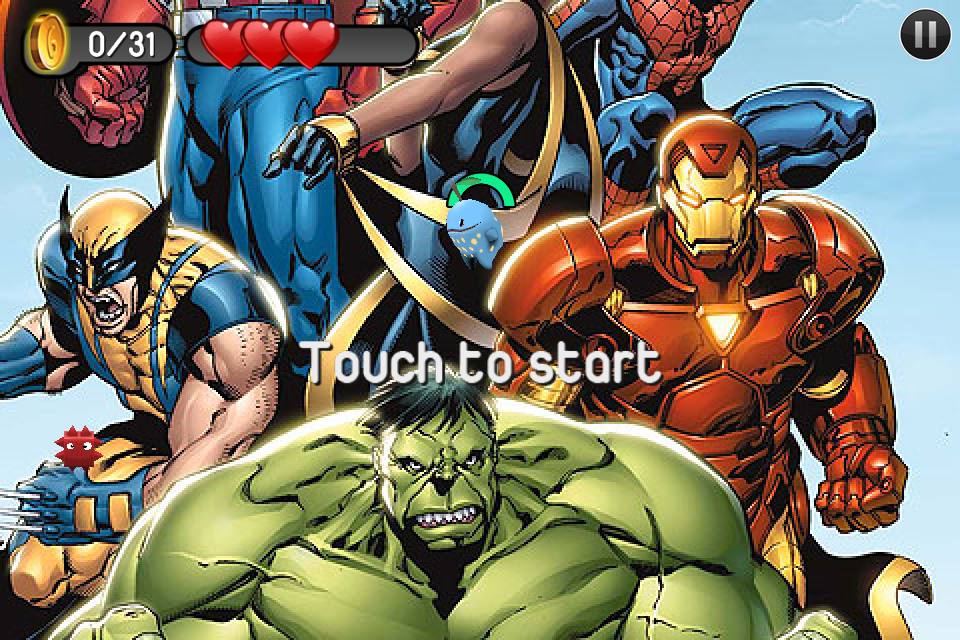
Marvel Piclings


Dan's Iron Maiden gig; the perfect level


Dan, stop Picling your nose (geddit? I'll see myself out...)

In addition to the 7 included levels, you can also import any picture from your device or use a picture taken directly from the camera to create a new level. Piclings will intelligently determine what parts of the picture act as walkable surfaces. You can also go into any created level and edit your own surfaces in or out in order to get the level just how you want it. Enemies, coins, and special items are also automatically placed in your created level.

The level creation is where Piclings really stands out. Basically, if you've got a picture on your iPhone (or iPod, iPad), then you can make a level out of it. You can also share your created levels, though this is only by way of emailing your photo to someone so they can save it to their device and use it in their copy of the game.

Taking Piclings as strictly a platforming game, it’s a fairly weak offering. The control mechanics are poor, and there isn't much to do in the game.

Despite this, Piclings is still a lot of fun based solely on the ability to create your own levels, and as it's free, you can't ask for more than fun.

Buy it from iTunes
 

thepart2

thepart1

headerticker

">Index »'); document.write('

<\/script>");

?max-results=10">Label 10
');
?max-results="+numposts1+"&orderby=published&alt=json-in-script&callback=showrecentposts1\"><\/script>");

thepart3

news
Support : Creating Website | Johny Template | Mas Template
Copyright © 2011. tbdemo12 - All Rights Reserved
Template Created by Creating Website Published by Mas Template
Proudly powered by Blogger