sidebar ad

Headlines News :

recent post

">Index »'); document.write('

?max-results=10">Label 1');
?max-results="+numposts1+"&orderby=published&alt=json-in-script&callback=showrecentposts1\"><\/script>");
">Index »'); document.write('

?max-results=10">Label 2');
?max-results="+numposts1+"&orderby=published&alt=json-in-script&callback=showrecentposts1\"><\/script>");
Showing posts with label ipad 2. Show all posts

The Walking Dead: The Game: Episode 2: Starved for Help Review (Ps3)


The second of five downloadable episodes, Starved for Help picks up three months after the zombie apocalypse broke out in Episode 1 of The Walking Dead, still playing as protagonist Lee Everett, protecting Clementine, and dealing with a group of survivors assembled at a makeshift fortress that used to be a motel.


The Walking Dead: The Game is all about choice and consequence, and in Episode 2, we get to see just how our choices have panned out. In a "Previously, on the Walking Dead", we see all the choices we made from Episode 1 carried over to the next instalment. This is a game where you don't get a second chance to say/do something (without starting a new game). You have a limited time to to make a choice that will influence your friends and make new enemies.


Starved for Help opens with a truly horrific moment (if you choose to play it that way) and after the gut wrenching blood bath is over, you then have to make a moral decision: The group's nearly out of food, and when it's up to you to choose which few survivors get rations for the day, you have to figure out if you're playing favorites or focusing on the greater good of the group. If you're smart, you can figure out a way to make the majority of people happy (or even take some food yourself).


Episode 2 gives us, for the first time, the real chance to decide if Lee's going to be an upstanding person or a survivor willing to do anything to live another day. It's the first time a game has had me debating whose side I was on and turning my back on established relationships, genuinely moving me in some cases. I can't think of another game that had me establish a character I thought I knew and had a connection with, then have me re-thinking big decisions a few scenes later, even though I knew I couldn't change it.

When a new group of survivors from the St. John's Dairy Farm show up and invite your group to come over and trade gas for food, you're left with the decisions of obviously taking their offer, or the unknown of whether or not you can trust these random strangers. The group needs food, you're pretty much out, and with the world gone to hell, you're going to need all the supplies you can get to keep your group alive, but are these guys legit?

Whatever choice you make, Episode 2 will shock you to your very core.


The most shocking entry so far, Starved For Help is a brilliant new episode of the Walking Dead game, and also the most brutal.


Machinarium Review (Android)


Does Amanita Design's whimsical point and click adventure deliver a game that plays as good as it looks?


[NOTE] Although it's available now on iOS and Android, it's only available to Duel-Core Android tablets and the New iPad and iPad 2.

Machinarium took the prize for "Excellence in Visual Art" back at the 2009 Independent Game Festival, and it is easy to see why. The game is stunning, like an interactive steam-punk graphic novel, bursting with hand drawn art that ripples with life and personality, Machinarium is certainly in a league of it's own when it comes to design.

On the gameplay side of things, it's a point-and-click adventure through-and-through, and fans of old school greats like Sam & Max and the Adventure of Monkey Island will be at home with the insane difficulty level. Yes, Machinarium will confuse and frustrate you to your very limits, but it's worth it to experience one of the most beautiful and endearing games I've ever played.


You command a cute little robot abruptly thrown out of his city with the trash. By pointing and clicking through the bleak steampunkish environment you can return him to his home, reunite him with his girlfriend, and even aid in preventing a terrorist attack.

Our robot buddy has the ability to stretch and scrunch his body, making for some interesting puzzle opportunities. There are is no dialogue in Machinarium (save for some odd sound effects) but when the robot encounters someone, a thought bubble will appear that shows the specific memory this individual conjures up. Despite the chilly atmosphere, these moments offer a wonderful sense of fanciful quality.


During the play through, I actually managed to get stuck on the second puzzle; it's that hard, but if you do need a hint (and you will), you can tap the light bulb in the corner of the screen and a thought bubble will appear above the robot indicating the ultimate goal for that particular room. It wont reveal how you actually solve the puzzle, but it helps.


However, if you truly need to be told, by clicking the small journal with a question mark, you can partake in a small 2-D shooter. By completing the brief mini-game, you'll be granted a detailed visual walkthrough of the scene you are currently in.

A flaw which did frustrate, was the robot and his walking. Once he's in motion you can't alter his course until he's reached his goal, making for a little too much downtime. It's not a big deal, but it does annoy.


All in all, Machinarium is a must-play for point-and-click fans. With it's gorgeous visuals, and, despite the lack of dialogue, the little robot is able to communicate more emotion to the player than most videogame characters. The music, with its subtle electronic soundscape that constantly shifts between making the player feel uneasy and calm is just outstanding, and goes hand in hand with the steam-punk style.

Judiciously and efficiently designed, with not a single pencil-drawn sprite out of place, Machinarium is a treasure that needs to be played to be believed, and if it wasn't for the few little niggles, Machinarium would have been the first App we scored a perfect 10, but as it is, it'll have to make do with one less.


Machinarium is an indie game project created and released by Amanita Design. A puzzle / adventure game, this game focuses on a little robot who's been thrown out to the scrap yard behind the city who must return and confront the Black Cap Brotherhood and save his robot-girl friend.


Also Available On: iOS (iPad 2/New iPad only), PC, Mac || Soon on: PS3

Rating:
E10+ for Everyone 10 and older: Comic Mischief, Use of Tobacco
Genre: Adventure
Publisher: Amanita Design
Developer: Amanita Design

The Walking Dead Game: Episode 1 Review (Ps3)


After Telltale Games disappointed us with Back To The Future and Jurassic Park, the initial response when it was revealed that the developers would be handling the Walking Dead Game was, well, not great. Have they redeemed themselves with the final product?


The deciding factor of The Walking Dead is ultimately down to one thing; the talking. If you're happy to get fully immersed in brilliant story telling, genuinely forming bonds with the characters and caring for your new found child 'side-kick', then the talking won't stop you. If you're not big on talking and would rather get down and gritty with zombies -- play Left 4 Dead.

In Episode 1: A New Day, you take on the role of Lee Everett, a man who may or may not be a killer, and your first introduction to him is in the back of a cop car, handcuffed and oblivious to the zombie apocalypse that's kicking off as he's escorted to prison.


You're given your first play with the conversation tree mechanic here, where you select what you want to say (or stay silent). The inclusion of 'split second' decisions is great, as you have only a limited amount of time to choose what to say, and it really adds to the pressure.


As you sit in the back of the cop car, talking with your chaperone, the games is happening concurrently with the comic book series, so as Lee's story kicks off at the start of the zombie apocalypse, Rick, the protagonist of the comics and TV show, is lying comatose in his hospital bed. This gives way to a whole new group of survivors, although expect a few familiar faces to pop up along the way.

It's not all talking, however, there are plenty of action sequences (a lot, actually), but whilst they're gore packed, Zombie smashing fun; they have the added effect of being very panic driven, and tie into the deep story remarkably well, but you'll spend the majority of your time making decisions and living with the consequences.


The outstanding feature Telltale has done, is the way your actions have consequences. When someone asks you a question, you have a limited time to pick one of four responses. Whatever you decide, you live with. Characters remember what you say and take note of your demeanour,usage, pronoun etc. While this might simply be someone questioning Lee's story in this episode, Telltale says the way people perceive him is going to drastically affect future episodes. What if your squad finds out you've been talking crap from the get-go? What if they find out all about your past? What if they push you out of the group? Or worse, take Clementine from you?


What I found with A New Day, is just how attached to Clementine I became. I wanted to do nothing but save her, cheer her up, reassure her that we'd find her parents, together. When she was hungry, I'd find her food. When she cut her finger, I franticly searched the office to find the First Aid Kit. But worse, when she got grabbed by a Zombie, there was no one that was going to stop me saving her.

It's extremely powerful stuff, and that's added to some of the choices you'll have to make. Think picking who lives and who dies will be easy? Think again. A solid example of this is on Hershel's farm. You have to decide whether to save Hershel's son, Sean, or your new acquittance Fred's much younger son, Duck. Did we mention Sean saved you earlier?
In a split second, you have to decide who you save, knowing full well that either action is going to have dire repercussions, and even cause you guilt.

There are the odd goof-ball moments, not mentioning anything specific, but you'd think a grown person would know to put batteries in a radio...


Overall

The Walking Dead is off to a great start, with outstanding game mechanics, immersing story and a genuine feel of characters. The bad part is waiting for Episode 2...


App Review: Front Line Commando (iOS)


Developer Glu goes all in with this pint-sized shooter that packs a hefty punch.


Frontline Commando is basically a shooting gallery, you move left/right, duck, and shoot. And that's it.


But where it excels, is that it not only looks phenomenal, but it controls brilliantly. It's a very simple affair, use one side of the screen to aim, and the other to shoot, with various buttons appearing for med-kits, ducking to reload etc.

Amazingly, even though the game is the same formula throughout, each level manages to be somewhat creative, helping to bring the repetitive nature to a minimum.

I'll be honest, there's not much I can say, if you've played a shooting gallery before, you'll know exactly what it's all about. And whilst it's simple fun, it's also a very good looking game, aided with accurate and brilliant controls, and as it's free, there's no reason you shouldn't try it.


Available now on the iOS App Store and Android Market, for FREE

The latest, greatest iPhone games

Our new contributer, Simon from Best Mobile Contracts has the low down on some of the best iOS games you can get your grubby mitts on over the festive season.


Almost as though game developers have calendars too, and know Christmas is just around the corner, a load of great stocking-fillers just got released for iPhone. Christmas? No-one buys iPhone games for Christmas, not when it's much easier to buy them for yourself than anyone else... which is why it still makes sense to get some decent games out, this time of year, perfect for picking up to treat yourself, since you're treating everyone else. Most of them cost less than a pint, too.


Infinity Blade II (£4.99 download, iPhone 3GS or better, iOS 3.2 or later)
It's here – the first major game release designed especially for the iPhone 4S, iCloud, and iOS5, as well as the sequel to probably the most critically acclaimed iPhone game ever. And a worthy sequel it is, retaining the original's focus on exciting melee combat action, but adding new fighting styles (you can now use either a two-handed weapon, a weapon and shield, or two weapons, with each option having its own advantages), deeper storytelling, and a richer world to explore.

A few customers have reported lost saved games, despite the iCloud integration with the game. Chair Entertainment are collecting info and working on a fix for this, but in the meantime they recommend downloading the latest iOS5 version to minimise problems.

Despite that minor teething trouble, we're confident in recommending Infinity Blade II as not just the best new iPhone game, but probably the greatest smartphone game ever released.

Bike Baron (£0.69 download, iPhone 3GS or better, iOS 3.2 or later)
If you like racing games, pick up Bike Baron. With zanier humour than Mario Kart, fast motorcycle racing action, 70 levels, and a fully featured level editor, this is well worth sixty-nine pence of anyone's money. Great stuff.


Spell Tower (£0.69 download, iPhone, iOS 4.1 or later)
Spell Tower is a word game, but it goes far beyond the usual Scrabble or Boggle approach, blending in some more traditional video-game aspects. Think Tetris meets Bubble Drop meets an anarchic brain-teaser, and you're close. The designer is a gamer first and foremost, rather than a word buff, and the resulting game is probably the freshest approach to word games that the world has seen since Bananagrams.


Bruce Lee (£1.49 download, iPhone 3GS or better, iOS 4.0 or later)
If that name sounds familiar to the over-40s, that's because this is a port of a 1984 eight-bit classic videogame, originally for the Commodore 64 computer. So, given the inevitably shabby-looking graphics, the price is a little steep – but given the almost equally inevitably amazing gameplay, it might be worth picking up anyway. You can't really go wrong with a platform/beat-em-up hybrid that lets you fight ninjas and sumo wrestlers as Bruce Lee.


Pet Shop Story (Free download, iPhone, iOS 3.0 or later)
If you like Farmville style social tycoon games, but are more into dogs and cats than cows and corn, you should at least try out Pet Shop Story. Breed your own strange hybrids, compete with or help your friends (including on the Facebook version), customise your pet shop's appearance, and enjoy the top-notch graphics.

Batman: Arkham City Lockdown Trailer

Now available on iOS, Batman: Arkham City Lockdown see's the inmates have (shockingly) escaped and Batman has his hands full defeating an army of henchmen and some of his most iconic villains. Scour the rooftops and the seedy underbelly of Gotham City through a series of one-on-one battles with the Joker, Two-Face and more, as well as the Batman: Arkham City Lockdown exclusive -- Deathstroke. Choose from several Batman skins and power-ups as you punch, kick and combo your way to cleaning up Gotham City.


Source: Video Youtube, buy at iTunes

Remembering Steve Jobs


Remembering the man who changed the technology world and influenced the era of "Think Different"


On October 5, 2011, Steve Jobs died in California at age 56 due to a long battle with pancreatic cancer.
The devastating news came to millions of tech fans all over the world.

Steve Jobs was a great man, and a brilliant influence and credit to the technology world, and everyone here at Tech Beever would like to send our condolences to Jobs' friends and family for their tragic loss.

The computer entrepreneur and inventor was co-founder, chairman, and chief executive officer of Apple Inc. and also served as chief executive of Pixar Animation Studios.

In 1978, Apple recruited Mike Scott from National Semiconductor to serve as CEO for what turned out to be several turbulent years. In 1983, Steve Jobs lured John Sculley away from Pepsi-Cola to serve as Apple's CEO, asking, "Do you want to sell sugar water for the rest of your life, or do you want to come with me and change the world?"

Later the following year, Apple aired a Super Bowl television commercial titled "1984". At Apple's annual shareholders meeting on January 24, 1984, to which an emotional Jobs introduced the Macintosh to a wildly enthusiastic audience.

In 1984, however, Sculley relieved Jobs of his duties as head of the Macintosh division. Jobs later claimed that being fired from Apple was the best thing that could happen to him; "The heaviness of being successful was replaced by the lightness of being a beginner again, less sure about everything. It freed me to enter one of the most creative periods of my life."

Following in 1985, Jobs founded NeXT Computer in 1985, which saw the birth of the NeXT workstation. The NeXT workstation was known for its technical strengths, with its object-oriented software development system. NeXT products were marketed to the financial, scientific, and academic community, highlighting its innovative, experimental new technologies, such as the Mach kernel, the digital signal processor chip, and the built-in Ethernet port.

In 1986, Jobs bought The Graphics Group (later renamed Pixar) from Lucasfilm's computer graphics division for the price of $10 million, with the first film produced by the partnership, Toy Story, bringing fame and critical acclaim to the studio when it was released in 1995. The company went on to (and still does) create brilliant animated films, including box-office hits A Bug's Life (1998), Toy Story 2 (1999), Monsters, Inc. (2001), Finding Nemo (2003), The Incredibles (2004), Cars (2006), Ratatouille (2007), WALL-E (2008), Up (2009) and Toy Story 3 (2010). Finding Nemo, The Incredibles, Ratatouille, WALL-E, Up and Toy Story 3 each receiving the Academy Award for Best Animated Feature.

The second generation NeXTcube was also released in 1990, with Jobs touting it as the first "interpersonal" computer which would replace the personal computer. The NeXTcube could share voice, image, graphics, and video in email for the first time. "Interpersonal computing is going to revolutionise human communications and groupwork", Jobs told enthusiastic reporters. In 1996, NeXT Software, Inc. released WebObjects, a framework for web application development. NeXT was acquired by Apple Inc. in 1997 and WebObjects was used to build and run the hugely popular Apple Store, MobileMe services, and the iTunes Store.

Apple's subsequent 1996 buyout of $429 million for NeXT brought Jobs back to the very company he co-founded, and he served as its CEO from 1997 until his tragic death in 2011.

Under Jobs's guidance the company increased sales significantly with the introduction of the iMac, and later, the iPod portable music player, iTunes digital music software, and the iTunes Store.

On June 29, 2007, Apple entered the mobile phone business with the introduction of the iPhone, a multi-touch display smartphone, which also included the features of an iPod and, with its own mobile browser, revolutionized the mobile browsing scene. While stimulating innovation, Jobs also reminded his employees that "real artists ship", by which he meant that delivering working products on time is as important as innovation and attractive design.

With the ever importance of the Mac, Macbook, iPod, iPhone and iPad series growing all the time, it's hard not to look at Steve Jobs' work and think that this man brought something to the world with every product he placed his fingers to. Even if you're not a fan of Apple, no one can argue the influence Jobs brought to the technology world, that even if you're a firm 'fanboy' of Android, that the iPhone was a true innovation of the smartphone world. And that the iPad may not have been the first tablet in the world -- it was almost certainly a revolutionary bound forward, bringing the love, and even 'need' for a stylish, yet magical device.

It's all these things and more, that make the loss of Steve Jobs; a man who wasn't afraid to "think differently", all the more tragic.

Steve Jobs will be sadly missed, but for all the work he's done, for products that will continue to grow and evolve -- he'll never be forgotten.

Shadowgun Best Looking Mobile Game Ever?

Shadowgun developer Madfinger Games has announced that its upcoming shooter will be hitting the iOS App Store September 28, with an Android release to follow shortly after.

These new screenshots have come to light showing off the game's impressive visuals (click for full-size):


Source: IGN

iOS App Review: Piclings

PiclingsPiclings [Free] from Pan Vision Games is a pretty interesting take on augmented reality in gaming. Sure, it’s a simple platforming game, but the main draw here, is that you can take any picture and turn it into a playable level filled with coins, items, and enemies. The tech works surprisingly well, and it’s undeniably fun to think of new and silly pictures to create levels from. However, the underlying gameplay mechanics are simple at best, and prove to be the games biggest downfall.

The game includes 7 levels to play including a tutorial which walks you through the basic controls. A touch anywhere directional stick moves you character left and right, and you can float like a helicopter in the air for a limited time by pushing up. The floating mechanic is pretty awkward to use, a standard 'jump' ability would have been much more welcome. Tapping anywhere on the screen will drop the Picling through the surface he’s currently standing on and down to the next.


There are a couple of enemies, and the only way to kill them is by luring the follower into another enemy, killing them both, or by grabbing an invincibility butterfly that lets you kill every enemy that you touch. It doesn't work well, and I found myself simply taking my time and collecting the coins to finish the level.

Scott Pilgrim and the Picling on his hair


Mario! Genius


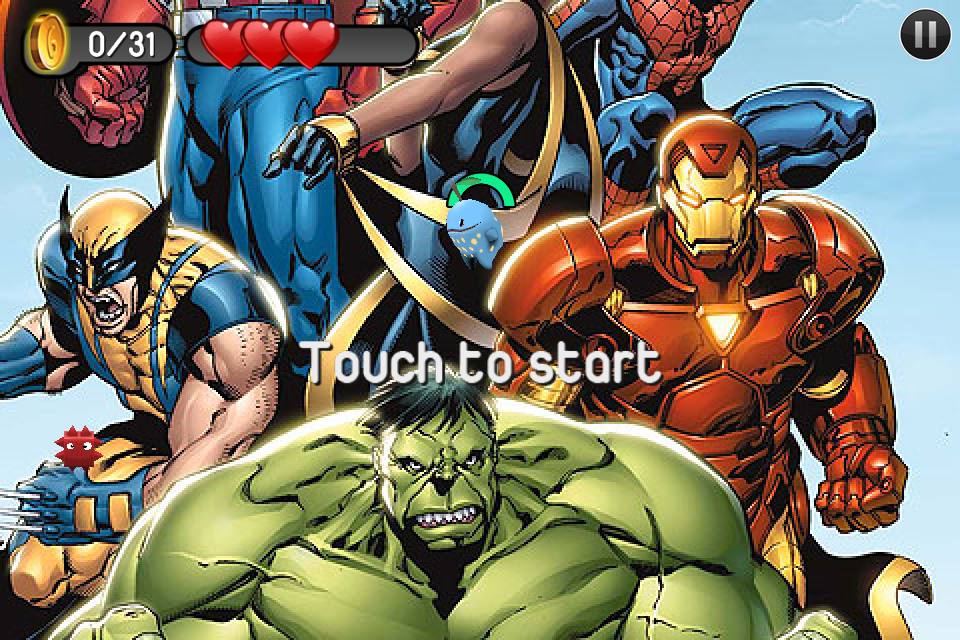
Marvel Piclings


Dan's Iron Maiden gig; the perfect level


Dan, stop Picling your nose (geddit? I'll see myself out...)

In addition to the 7 included levels, you can also import any picture from your device or use a picture taken directly from the camera to create a new level. Piclings will intelligently determine what parts of the picture act as walkable surfaces. You can also go into any created level and edit your own surfaces in or out in order to get the level just how you want it. Enemies, coins, and special items are also automatically placed in your created level.

The level creation is where Piclings really stands out. Basically, if you've got a picture on your iPhone (or iPod, iPad), then you can make a level out of it. You can also share your created levels, though this is only by way of emailing your photo to someone so they can save it to their device and use it in their copy of the game.

Taking Piclings as strictly a platforming game, it’s a fairly weak offering. The control mechanics are poor, and there isn't much to do in the game.

Despite this, Piclings is still a lot of fun based solely on the ability to create your own levels, and as it's free, you can't ask for more than fun.

Buy it from iTunes

Pokèmon Heading To iOS and Android


Engadget have released a post regarding Pokèmon heading to iOS and Android, something that hit news earlier last week, but that news was a "music game". You can read the whole article here, but one section made us take more attention.

Taken from Engadgets article:
"With all of that in mind, it was a bit surprising to hear that a Pokemon card game is headed for the iPhone and Android devices in Japan this summer -- after all, Nintendo does own a share of the popular monster-based franchise."


I'd like to point you all in the direction of our Pokèmon Proposition articles posted along a while ago, Here, here, here and here

Yes, OUR idea that we put to both Apple and Nintendo. We'll update as and when we get more info.

Tech Beever is not happy.

iOS 5 The Full Update News


Well, the wait is finally over, iOS 5 is here, and is the biggest update for Apples iDevice OS ever. But what exactly is here? Well Engadget has compiled a full breakdown of what's in store, ready for it's official release later this Fall.


Apple iOS 5 hands-on preview

iOS 5 won't be ready for the masses until this Fall, but lucky developers -- and eager tech bloggers -- are able to get in on the action right now. We just got done downloading the 730MB BETA, and have decided to turn our iPhone 4 and iPad 2 into guinea pigs for all the newness. Apple says that there are over 200 new features baked into the updated OS, and we've run through the biggies from Notification Center to Twitter to that oh-so-convenient split keyboard for you -- all you need to do is click after the break.


Many of the new features in iOS 5 are things we've been sitting, waiting, and wishing for since the iPhone first launched. Complete with a more robust notification scheme and a brand new messaging protocol, Apple has filled in many of the gaps that have left it behind other OSs like Android and webOS.

When you first power up the device, you're greeted with an option to select your WiFi network -- a necessary step for all the cloud-related goodies and WiFi sync features that are now present in the OS. Once you're online, you enter your Apple ID, or can sign up for one directly on the device you're using -- which is great for those of us living in a post PC era. After that you get prompted on whether or not you'd like to use iCloud -- which you obviously do -- followed by an option to use the free Find My iPhone service. Finally, after deciding whether or not you'd like to share your usage stats with Apple or not (take a guess at what we chose), you're up and running to "start using the most advanced iOS ever" -- Apple's words, not ours. Now that the hard stuff is out of the way, let's get on to what you've most been waiting for: the new stuff.

Notification Center


We've lamented about iOS's seemingly archaic popup notification scheme since we received our first text message ever on an iPhone -- and then scratched our heads even more when we got our first push notification on an iPad. Apple has taken the Android approach in iOS 5, and has made a home for all notifications in a drawer that is toggled by a swipe down from the top of the screen. When you get a notification, it pops in from the top with a different color so it's not missed, and if not addressed it disappears with a rotating-cube transition. It's quite nice, and looks remarkably like the MobileNotifier jailbreak app -- which is probably not a coincidence given that developer's most recent employer. We should also mention that weather and stock updates are now nested in the notifications tray for quick access, and it updates by location automatically.
Notifications also live on the homescreen, though it looks as if they only appear when a new notification has appeared after the device has been locked. Meaning, if you get an email and don't read it while you're doing something else, notifications don't show up on the homescreen. However, if you get one while the device is locked, all notifications appear and you're given the option to swipe directly to any one of your choosing. We hope this becomes an option before this OS goes gold, but for now, it's simply so much better than what we had before, so we don't want to get too picky (especially in a BETA).


iMessage


Apple has taken on the current king of mobile-to-mobile instant messaging, BBM, with its own take dubbed iMessage. iMessage is integrated right into the Messages app on the iPhone, which is now present on the iPad for the first time. Apple touted the service's ability to recognize when you're messaging someone else eligible for iMessages, but it appears to be limited to e-mail addresses at this point in the BETA. Delivery confirmation is turned on by default, but those of you who don't like the thrill of the chase will be happy to learn that there's an option to disable read receipts. This means that if you don't want the person on the other end to know you've read it, they never will. By default, it works with your Apple ID e-mail address, but you can add as many as you'd like from the settings application after verifying that you do indeed own the account. We should also mention that messages are pushed to all devices you're logged into, so you might want to get used to those push notifications if you carry around an iPad and an iPhone. We're looking forward to putting iMessage to a rigorous test once it's in the final software, but for now we can report that it does work, and seems quite fast -- especially with iCloud integration and multiple devices.

Update: We've played with iMessage a little more and it looks like the differentiating factor between iMessages and SMSs is the color. When someone is eligible for an iMessage, the text in the box reads "iMessage" (as opposed to "Text Message") and the bubbles all turn blue. We're still not quite sure how a device tells email accounts apart from phone numbers, but there's likely something magical and revolutionary taking place on Apple's backend. Text bubble previews appear when the other person is typing, along with read confirmations which include the time.

Another minor thing we've noticed is that push notifications look identical for both iMessages and SMSs since they use the same icon. It's a bit confusing to figure out the difference between them at first, but once you've started one type of conversation, the different color schemes serve as indicators.

Newsstand


The rise of newspaper and magazine apps for the iPad -- not to mention Apple's subscription offerings -- has given birth to Newsstand, a one stop shop for keeping track of all those types of publications. When iOS 5 launches in the fall, there will be a new section of the App Store for newspapers and magazines with subscriptions, so you'll be able to fill it up to your heart's content -- or 'till you're out of storage space. But for now, all we're given is a nice empty bookshelf that's identical to the iBooks interface but uses a folder dropdown. It makes us think that Apple isn't quite done with folders just yet.

Twitter


One of the rumors that gained a bit of traction before the keynote was native Twitter integration directly inside iOS. It's now possible to Tweet from within Apple's native apps: websites in Safari, or photos in the Camera app. The "Tweet" button is located under the familiar sharing pane, and ticking it pops up the keyboard along with an overlay that resembles an index card, complete with ruled lines and a paper clip to visualize what you're attaching. Geotagging is available through a simple tap of the "Add Location" option, and one more tap sends the tweet out to all your followers.

The keyboard adds dedicated @ and # keys when you're tweeting, and autocompletes usernames to help you out. The integration here is really slick, and you can add multiple accounts from new Twitter option in the Settings app. There's also the option to automatically link your contacts to their Twitter names. We follow over 200 people, and it was only able to update 66 of our contacts -- though without any options or indications, we couldn't quickly identify who it was able to match. If you're a big Twitter-er, you're going to like this... Your followers? maybe not so much.

Reminders


We're sure there are a bunch of unhappy developers now that Apple has come through with its own first party solution for reminders on its i-devices. When you launch the app, you'll see two screens: Tasks, and Completed. Adding a task is as simple as tapping the + button, and there are more options for reminders, due dates, and priority sorting. You can make other lists for specific tasks, and when complete they'll automatically transfer over to the Completed list, so you can get on with 527 other things you have to do.

The iPad version of the app also makes use of the extra screen real estate with a handy split view that lets you visualize tasks on a monthly calendar. We also noticed that tasks weren't syncing between our devices, but it could very well be a setting we missed. Additionally, if you set a reminder for a task, you'll get a push notification in that handy tray reminding you to get that stuff done. Apple's website mentions the ability to set reminders by location, but our build of the BETA didn't seem to have that functionality.

Update: Reader Mark F. has written in to let us know that apparently location features are present, but only when a task is associated with an iCloud list.


Camera


Apple's updated the native Camera app in iOS to do more than just... take photos. In addition to snapping pics and vids, the iPhone gets an option to lock focus and exposure by holding down on a part of the image. Zoom controls are now activated via pinch-to-zoom, which makes sense but feels a lot more sensitive than the previous tap-and-drag method. Oh, you can also use the volume up button to take photos -- another biggie that many folks have been asking for.

In terms of photo editing, Apple has added basic features like auto-enhance, red-eye reduction, rotation, and cropping, though confusingly you have to switch to the Photos app to do so. That's right, photo editing controls aren't available in the Camera app on the iPhone. You have to switch over to the Photos app, which is not the case on the iPad. We're unclear about this disconnect, and it'll probably be addressed before launch. The features here are more than enough for the casual user, but photography aficionados (who can make do with an iPhone at all) will probably be sticking to more robust apps. Finally, you can quickly jump straight to the camera even if your iPhone is locked by double tapping the home button -- a great tweak that'll make those difficult to capture moments just a bit easier. This feature seems to be limited to the iPhone for the moment, but anything could change at release.

Safari Reader and updated tabs


Mobile Safari for iPad has been updated to take advantage of the larger screen real estate in a more effective manner with a glorified tab bar instead of the old grid layout. As far as we can see, it maxes out at nine different pages, but looks virtually identical to the tab layout in Safari on Mac (or PC). You can re-order tabs by holding and dragging them sideways, and Safari appears to cache pages when not active so you don't have to reload them when you switch back and forth.

Also baked in to mobile Safari for both the iPhone and the iPad is Safari Reader, which strips out all the nasty formatting from webpages and leaves you with raw text and images. This feature first made an appearance in Safari on the desktop but has made the jump to iOS with the latest software update. It's disturbingly similar to Instapaper, and yet another common feature that can't be ignored.


Split keyboard, text macros, and other various tweaks and settings


There are tons of other goodies that we found while poking and prodding through the new OS that we simply had to share with you. First off, there's a handy new split keyboard for the iPad that makes thumb typing lightyears easier than with the previous fullscreen option. Placing two fingers on the keyboard and moving outwards is enough to break the keyboard in half, and the screen animation is pretty nifty too. It's probably one of the things we like most on the iPad update, and is another feature that just makes sense.

The Settings app is chock full of new features that will make power users thrilled. Our favorite is the addition of text shortcuts, which can be added in the keyboard settings pane. This allows you to set personalized text macros for frequently typed phrases, and is a huge addition for things like constantly typing email addresses and the like. Sound settings are also fleshed out, allowing users to change the various alert tones, as well as configuring varying vibration schemes.

The accessibility settings aren't a usual place for many folks to wander, but here you can further tweak interaction options on your iPhone. The most notable is the ability to enable the LED flash for alerts, which effectively brings a status light to the iPhone. We also found something called "AssistiveTouch" which purportedly allows the iPhone to interact with adaptive accessories. Lastly there's the option to create custom gestures. We couldn't figure out what those were for, nor how to invoke them, so we'll just have to wait on that one.

Wrap-up


Believe it or not, we've barely scratched the surface of what's in store for iOS 5, but hopefully this preview is enough to help you make sense of it all. None of this code is finalized, but performance seems to be fairly good for the first developer preview build. We're super excited to see what else Apple has in store for this -- and what developers will do with the various new APIs -- so we'll just have to wait until the fall for the t's to be crossed and the i's to get dotted. For now, though, we'll just sit back, relax, and let Apple's spftware engineers work their coding magic and flesh out all the issues to get this OS ready for the masses.


thepart2

thepart1

headerticker

">Index »'); document.write('

<\/script>");

?max-results=10">Label 10
');
?max-results="+numposts1+"&orderby=published&alt=json-in-script&callback=showrecentposts1\"><\/script>");

thepart3

news
Support : Creating Website | Johny Template | Mas Template
Copyright © 2011. tbdemo12 - All Rights Reserved
Template Created by Creating Website Published by Mas Template
Proudly powered by Blogger